
Last Updated: November 16, 2026
Quick Summary
The wired vs wireless choice for a new build comes down to reliability versus flexibility. Wired systems use physical cabling for stable, low-latency control that keeps working during internet outages, while wireless systems install faster and suit retrofit. Most new builds work best with a hybrid: wired backbone, wireless where flexibility matters.
- Decide before first fix, because adding control points after plasterboard means chasing walls or surface trunking.
- Specify containment one size up from current need so later cable pulls are possible without chasing.
- Run network cable to ceiling access point positions with wired backhaul rather than a mesh of mesh.
- Wireless reliability depends on access point placement, wired backhaul and channel planning, not the protocol alone.
- A hybrid system keeps lighting, heating and security on the wired layer and adds sensors wirelessly.
Table of Contents
- Wired vs Wireless Smart Home Systems: What New Builders Need to Decide
- Smart Home Wiring for New Builds: The Infrastructure Checklist
- Reliability, Latency and Connection Stability Compared
- Wired Home Automation System: Pros, Cons and Installation Impact
- Wireless Systems: Flexibility, Retrofit and Where They Fall Short
- Hybrid Smart Home System Design: Getting Both Without Compromise
- Future-Proof Smart Home Wiring and Whole-Life Ownership
- Planning Your New Build Integration with AME Electrical
- Frequently Asked Questions
Wired vs Wireless Smart Home Systems: What New Builders Need to Decide
The wired vs wireless decision is the one choice in a new build that you cannot revisit cheaply later.
A wired smart home system is one where devices connect to a central controller over physical cabling, typically structured cabling and Ethernet, rather than relying on Wi-Fi or radio protocols. That single definition explains most of the reliability, cost and flexibility differences that follow.
Why the decision has to be made before first fix
First fix is when cables and containment go into walls and floors. After plasterboard goes up, adding a control point means chasing walls, lifting floors or accepting surface trunking. The decision is not really about which system is better in the abstract. It is about which routes you leave open while they are still cheap to install.
Get this wrong and you live with it. Get it right and both options stay available.
Smart Home Wiring for New Builds: The Infrastructure Checklist
Smart home wiring for new builds works best when you plan cabling routes, containment and control points before first fix, not after. The checklist below covers the decisions that are expensive to reverse, and it is organised the way a new build actually progresses rather than as a flat list of wishes.
Before first fix: design decisions
- Plant room or comms cupboard identified, with power, ventilation and space for a controller, network switch, patch panel and any AV or heating equipment
- Cable routes from the plant room to every room, with at least one spare route per zone and a documented schedule
- Containment sized for future cable, not just today’s, a common pattern is to specify conduit one size up from the current requirement so a later pull is possible without chasing
- Control points at doorways, bedside positions and main living zones, agreed on a plan rather than decided on site
- Network cabling to access point positions for ceiling-mounted units, with cable run to the ceiling void rather than to a wall box
- Wired backhaul between access points, so wireless devices have a solid backbone rather than a mesh of mesh
- Distribution board capacity for smart controllers alongside conventional circuits, with spare ways for later additions
- Labelling and schedules so the next owner or installer can understand the system without guesswork
Room-by-room planning
A practical way to brief an installer is to walk the plan room by room and record what each space needs. The detail matters more than the format.
- Hallway and landing: control points at each doorway, a network point for an access point, and a route to the front door for a video entry or doorbell
- Living room: multiple control points, a route for a TV or media wall, and spare capacity for future audio
- Kitchen: control points at the main entries, a route for under-cabinet lighting, and separation between power circuits and any control cabling to reduce interference
- Bedrooms: bedside control points, a network point for an access point if coverage is weak, and a route for blinds or curtains if motorised shading is planned
- Bathrooms: control points outside the room, with any in-room device rated for the zone
- Utility and plant: routes for heating controls, hot water and any metering, plus space for the controller and network equipment
- Garage and outbuildings: a route for network and control cabling, ideally in conduit, so a later workshop or EV-related device is not a retrofit
Cable and containment specifics
Structured cabling to a patch panel in the comms cupboard is the backbone most wired systems assume.
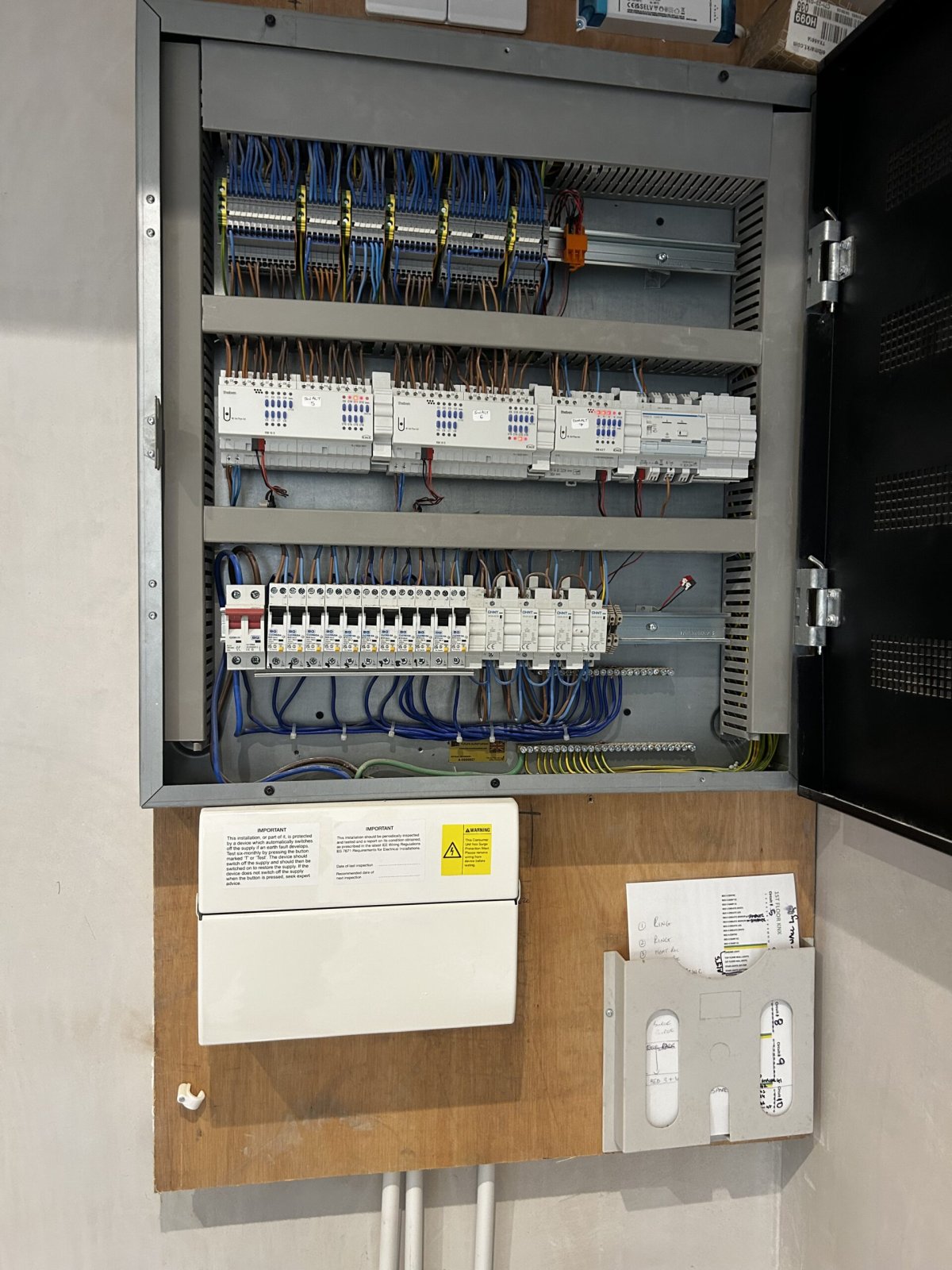
Industry guidance increasingly points the same way. For the standards behind those routes, see our guide to smart home wiring standards, and for the case for a proper network backbone, read the benefits of structured cabling for luxury homes.
Watch out: the most common failure is specifying cable routes room by room without first agreeing the control points and network topology, which produces a system that works but cannot grow.
Reliability, Latency and Connection Stability Compared
Wired connections win on reliability, latency and stability; wireless wins on installation speed and flexibility. That is the short answer, and it holds across most new builds. The longer answer is about mechanism, because the difference is not magic, it is physics and topology.
A hardwired system carries control signals over cable, so signal interference from thick walls, foil-backed insulation and competing networks is not a factor. Latency stays low and predictable because the signal does not have to be retransmitted or contend for airtime.
Why wired is more stable in practice
A wired control signal travels on a dedicated conductor or bus. It does not share spectrum with neighbouring Wi-Fi, it is not attenuated by masonry or metal studwork, and it does not degrade when a microwave runs. The result is consistent behaviour: a lighting command sent from a wall panel arrives at the controller in the same way every time. The reliability advantage tends to be most noticeable in larger properties, where wireless coverage has to be engineered rather than assumed.
Where wireless stability is won or lost
Wireless reliability is not a property of the protocol alone. It is a property of the network design. Three things matter most:
- Access point placement: ceiling-mounted units in circulation spaces usually outperform units hidden in cupboards or behind furniture
- Wired backhaul: access points connected by cable to the network switch avoid the throughput loss of a wireless mesh hop
- Channel planning: in dense areas, neighbouring networks compete for the same channels, and a plan reduces contention
A mesh network built on a weak backbone struggles in larger properties. Mesh is a useful tool, but it is not a substitute for a wired backbone where the building allows one.
Local control and outages
This is the part most comparisons skip.
| Factor | Wired | Wireless |
|---|---|---|
| Connection stability | High, predictable | Varies with layout and network design |
| Latency | Low and consistent | Can fluctuate with congestion |
| Signal interference | Not applicable | Walls, insulation and congestion affect it |
| Installation disruption | Higher at first fix | Lower |
| Retrofit suitability | Poor after completion | Strong |
| Scalability | Strong with planned routes | Easy to add devices |
| Behaviour during internet outage | Local control can continue | Depends on cloud dependence |
Fortune Business Insights’ market analysis notes that wired protocols generally provide stronger reliability, lower latency and less signal interference than wireless alternatives. That does not make wireless a poor choice.
Watch out: treating wireless reliability as a product specification rather than a network design outcome is the most common reason a wireless system underperforms in a new build.
Wired Home Automation System: Pros, Cons and Installation Impact
A wired home automation system delivers the most dependable foundation for lighting control, heating control and security, provided the infrastructure is planned in. The installation impact is front-loaded: more design work and more cable at first fix, then very little disruption afterwards.
Pros:
- Centralised control with consistent behaviour across the home
- Local control that keeps working when the internet is down
- Strong scalability when spare routes exist
- Long service life with straightforward maintenance
Cons:
- Higher upfront cost in design and cabling
- Changes after completion are disruptive
- Requires an installer who understands system design, not just wiring
Watch out: the most common mistake is specifying cable routes room by room without planning the control points and network topology first. The result is a system that works but cannot grow.
Wireless Systems: Flexibility, Retrofit and Where They Fall Short
Wireless systems are the practical choice where cabling is impossible or unwanted.
Investopedia’s smart home overview describes the trade-off plainly: wireless systems can be easier to install, while hardwired systems can be more reliable. In a new build, that convenience argument is weaker, because the walls are open anyway.
Where wireless falls short is in dependence on network coverage. A mesh network built on a weak backbone struggles in larger properties.
Hybrid Smart Home System Design: Getting Both Without Compromise
A hybrid smart home system combines wired infrastructure with wireless devices, and for most new builds it is the sensible answer.
In practice, that means structured cabling and wired backhaul for the backbone, access points for coverage, and wireless devices where flexibility matters more than permanence. Lighting control, heating control and security sit on the wired layer.
This is not a compromise. It is how you keep device compatibility and interoperability open as protocols change.
Future-Proof Smart Home Wiring and Whole-Life Ownership
Future-proof smart home wiring is about leaving options open, not predicting the future. Cabling that supports open protocols and spare capacity protects the investment better than any single product choice.
Not everyone agrees. A Houzz discussion on wired versus wireless systems argues that wired systems may become obsolete as technology advances.
Whole-life cost matters more than upfront cost. Maintenance cost is lower when routes are accessible. Upgrade cost is lower when spare capacity exists. Our guide to future-proofing smart homes covers the practical choices.
Planning Your New Build Integration with AME Electrical
Planning is where this decision either holds up or falls apart.
We handle the complexity: control points, network design, third-party integration and handover documentation. You get a system you can actually operate, with ongoing support after completion. For the step-by-step process, read our guide to planning a KNX smart home installation project.
The challenge is simple: most new builds still get smart home wiring designed after the cables should already be in. If you are at design stage, bring the integrator in before first fix rather than after.
Frequently Asked Questions
Is a wired or wireless smart home system better for a new build?
For a new build, wired usually wins on reliability and long-term value because the cabling goes in before plasterboard closes the walls, when the disruption costs nothing extra. That said, most high-end projects end up hybrid: wired backhaul and structured cabling as the spine, with wireless devices for the rooms you may never cable.
Can you combine wired and wireless smart home technology?
Yes, and a hybrid smart home system is often the sensible answer. Wired infrastructure carries the backbone: network cabling, control wiring and a wired backhaul to access points, so streaming, security and heating control stay stable. Wireless protocols such as Zigbee, Z-Wave, Matter and Wi-Fi then handle devices where a cable run is impractical or where you want flexibility later. The key is designing both routes together at first fix rather than bolting wireless onto a wired plan after handover.
Is wired home automation more reliable than wireless?
Generally yes. Wired connections avoid the signal interference, range limits and contention that affect Wi-Fi and mesh networks in a busy household, and a wired home automation system keeps working through an internet outage because local control sits on the network itself. Wireless reliability has improved, but it still depends on access point placement, channel congestion and device compatibility.
Can a wireless smart home system be added after a house is built?
Yes, wireless is the practical route for retrofit because it needs no chasing or redecoration. The trade-off is that you inherit whatever cabling the original build left behind, which is often minimal. If you are still at design stage, planning smart home wiring for new builds now keeps that option open: run conduit and spare network cabling to key rooms so a future upgrade does not mean lifting floors. Ask your installer for a handover pack showing every cable route and control point.
